How to delete iMessage sticker App from your Phone

To delete any unwanted iMessage Sticker apps

Follow following steps

  1. Open iMessage App
  2. Tap on “+” button at bottom left corner
  3. Tap on Stickers
  4. Tap on Edit button on top right corner
  5. In Sticker List screen Tap on Edit button on top left corner
  6. Delete the app you don’t want to have.
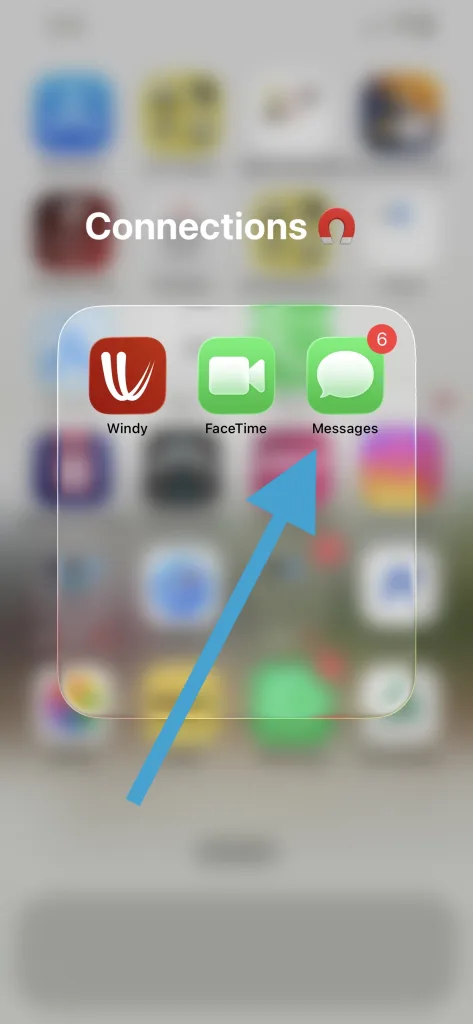
1 openiMessageApp
Step 1- Open iMessage App

2 iMessage plus
Step 2 – Tap on + button on bottom left corner
3 Open Stickers
Step 3 – Tap on Stickers
4 Tap edit stickers
Step 4 – Tap on edit button on top right corner
5 edit messages
Step 5 – Tap on edit button on top left corner
6 delete sticker app
Step 6 – Delete the app you don’t want to have

We have shown our “Love Stickers – Ora and Omi” in above screenshot.

You can find it on iMessage Appstore

https://apps.apple.com/us/app/love-stickers-ora-and-omi/id6755204092

Cute Daily Stickers iMessage
Ora Omi Cute daily moments
FightStickers
Ora Omi Fight Stickers
LoveStickersiPhoneiPad
Ora Omi Emotion Stickers
RomanticMovements
Ora Omi Romantic Moments
IMG 4787
Ora Omi Missing someone?
PremiumStickersApp
180+ Premium Stickers

Leave a Comment

Your email address will not be published. Required fields are marked *

Scroll to Top