EXIF Metadata Vulnerability: Everything You Need to Know
How EXIF metadata can expose your location and identity, what the real risks are, and how to remove it before sharing a photo.
By Mohith K MUpdated 6 min read
Introduction to EXIF Metadata
In the world of digital photography, EXIF metadata vulnerability is an important concern. EXIF stands for Exchangeable Image File Format, and it stores crucial information within image files, such as photos taken on your smartphone or digital camera. However, this metadata can expose sensitive information, making your photos vulnerable to privacy risks and cyber threats.
Whenever you take a photo with your camera or smartphone, it automatically records extra information known as EXIF data. This includes:
- Date and time the photo was taken
- Camera settings (aperture, shutter speed, ISO, etc.)
- Device model and brand (such as iPhone 14 Pro or Nikon D850)
- GPS location where the photo was taken (if geotagging is enabled)
- Software used for editing or processing
These details help photographers understand how a photo was captured, but there’s a darker side to EXIF data that poses a risk to your privacy.
What is the EXIF Metadata Vulnerability?
The EXIF metadata vulnerability refers to the fact that personal and sensitive information, stored in EXIF metadata, can be exploited. This information can be used by malicious actors to uncover details about a person or location without their knowledge. The vulnerability lies in the fact that many users aren’t aware this data even exists, let alone that it’s shared every time they upload or share an image online.
For example, a photo you upload to social media might reveal:
- The exact GPS coordinates of where you were when you took the photo (potentially your home or workplace)
- The date and time, giving clues about your routine or schedule
- The device model, which might hint at your lifestyle or income level
Because of this, EXIF metadata can be exploited for cyberstalking, identity theft, and other privacy violations.
Why EXIF Metadata Can Be Dangerous
Let’s break down the key dangers posed by EXIF metadata vulnerabilities:
1. Revealing Your Location
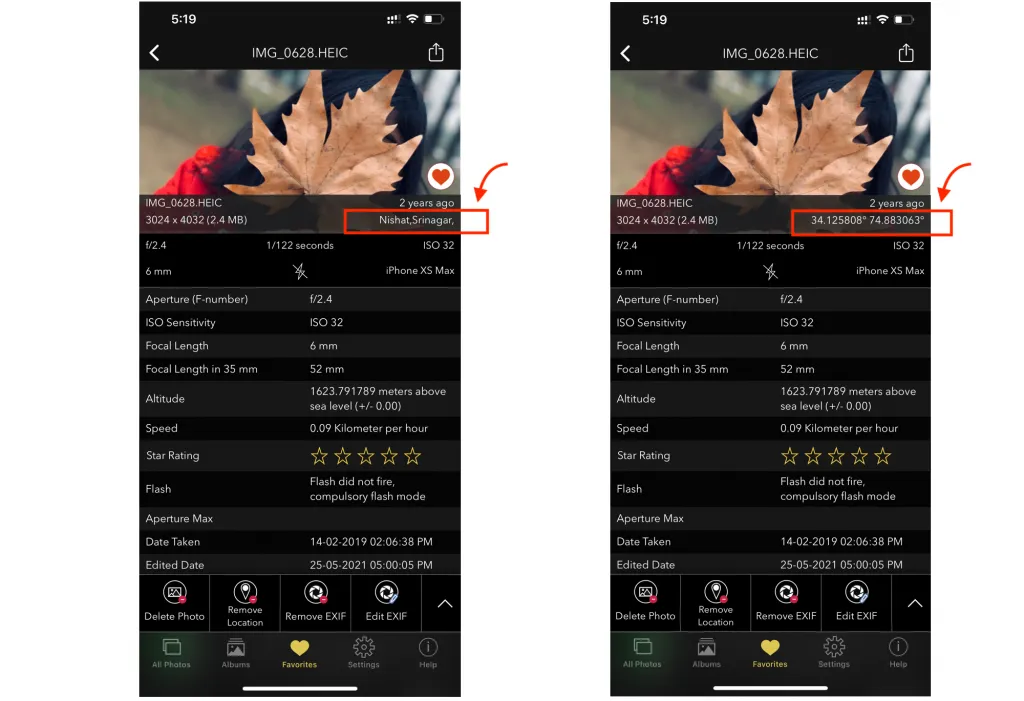
If your smartphone or camera has GPS enabled, the EXIF data may contain the latitude and longitude of where the image was taken. Imagine uploading a selfie from your home, unknowingly sharing your exact home address. Criminals or stalkers could use this information to track your movements and whereabouts.
2. Unintentionally Exposing Personal Information
Beyond location, EXIF data might reveal sensitive dates (such as the exact time you were at a specific event) or the type of device you own. This can help attackers build a profile of your life, interests, and even your financial status.
3. Cyberstalking and Harassment
Cyberstalkers can exploit EXIF metadata to track someone’s movements and potentially confront them in real life. For instance, an uploaded vacation photo might reveal your hotel’s location, making you vulnerable to unwanted contact.
4. Identity Theft
EXIF metadata, when combined with other online information, can help cybercriminals steal identities. They could piece together information like your location, devices, and other personal details to impersonate you.
Real-World Cases of EXIF Exploitation
There have been several cases where individuals were harmed due to unintentional sharing of EXIF data:
- Celebrity stalking incidents: Some celebrities have been stalked after uploading geotagged photos to their social media profiles. These photos allowed stalkers to pinpoint their exact locations and harass them in person.
- Journalist safety concerns: In conflict zones, journalists who share photos with embedded EXIF data can unintentionally reveal their locations, putting them at risk from hostile parties.
How to Protect Yourself from EXIF Metadata Vulnerability
Understanding the risks associated with EXIF metadata is crucial, but protecting yourself is relatively easy. Here are several methods to safeguard your privacy:
1. Disable Location Services for Camera Apps
Most smartphones automatically store GPS location data in your photos. You can prevent this by disabling location services for your camera app:
- iPhone: Go to Settings > Privacy > Location Services > Camera, and select “Never.”
- Android: Open Camera app > Settings > Turn off “Location tags” or “Geotagging.”
2. Remove EXIF Data Before Uploading Photos
Before sharing images online, it’s a good idea to strip EXIF data. Here’s how:
Windows: Right-click the image > Properties > Details > “Remove Properties and Personal Information.”
Mac: Open the image in Preview > Tools > Show Inspector > Exif > Delete Metadata.
Online tools: Online Websites allow you to upload images and remove EXIF data.
EXIF Tools to view EXIF Data on your iPhone, iPad, Android, Windows and Mac OS
3. Use Privacy-Focused Platforms
Certain social media platforms (like Instagram and Twitter) automatically remove EXIF metadata when you upload images. However, platforms like Facebook may retain some metadata, so be cautious.
4. Check Metadata Before Sharing
Always check the EXIF metadata of an image before sharing. You can use apps like EXIF Viewer by Fluntro (available on the App Store) to view and remove metadata from photos on your iPhone.
5. Use VPNs and Security Tools
For added protection, use VPNs (Virtual Private Networks) when uploading images. VPNs can help mask your IP address and make it harder for hackers to track you through EXIF data.
Can EXIF Data Be Completely Removed?
Yes, you can completely remove EXIF data from your images. Many software applications and tools allow you to strip EXIF metadata before sharing images:
- GIMP (a free photo editor) allows you to remove EXIF data by saving images with metadata options disabled. https://www.gimp.org
- ImageOptim (Mac) compresses photos and removes EXIF data automatically.
- Photoshop also has options to save images without metadata.
By using these tools, you can ensure your photos are free from sensitive data before sharing them online.
How to Detect EXIF Metadata in Photos?
If you’re curious about the EXIF metadata attached to your photos, there are several methods to check:
- Right-click an image on your computer and view its properties (details or information).
- Use an app like EXIF Viewer by Fluntro to easily view EXIF data on your iPhone.
- Online tools also allow you to upload images and inspect their metadata. But you are at risk of uploading your photo to someone’s server.
Conclusion: Stay Safe by Managing EXIF Metadata
In today’s digital age, it’s crucial to be aware of the EXIF metadata vulnerability and take steps to protect your privacy. By disabling geotagging, stripping EXIF data, and using secure platforms, you can significantly reduce the risk of exposing sensitive personal information.
Remember, while EXIF data is useful for photographers, it can also be a gateway for cyber threats. Whether you’re a casual smartphone photographer or a professional, taking these simple steps can go a long way in ensuring your digital safety.
Frequently Asked Questions (FAQ)
1. What is EXIF data?
EXIF (Exchangeable Image File Format) data is metadata stored in digital images. It contains details like the camera model, settings, and even the GPS location where the image was taken.
2. Can EXIF data be dangerous?
Yes, EXIF data can reveal sensitive information like your location or the exact date and time a photo was taken, which can be exploited by malicious actors.
3. How can I remove EXIF data?
You can remove EXIF data using built-in tools on Windows and Mac, apps like EXIF Viewer by Fluntro on iPhone
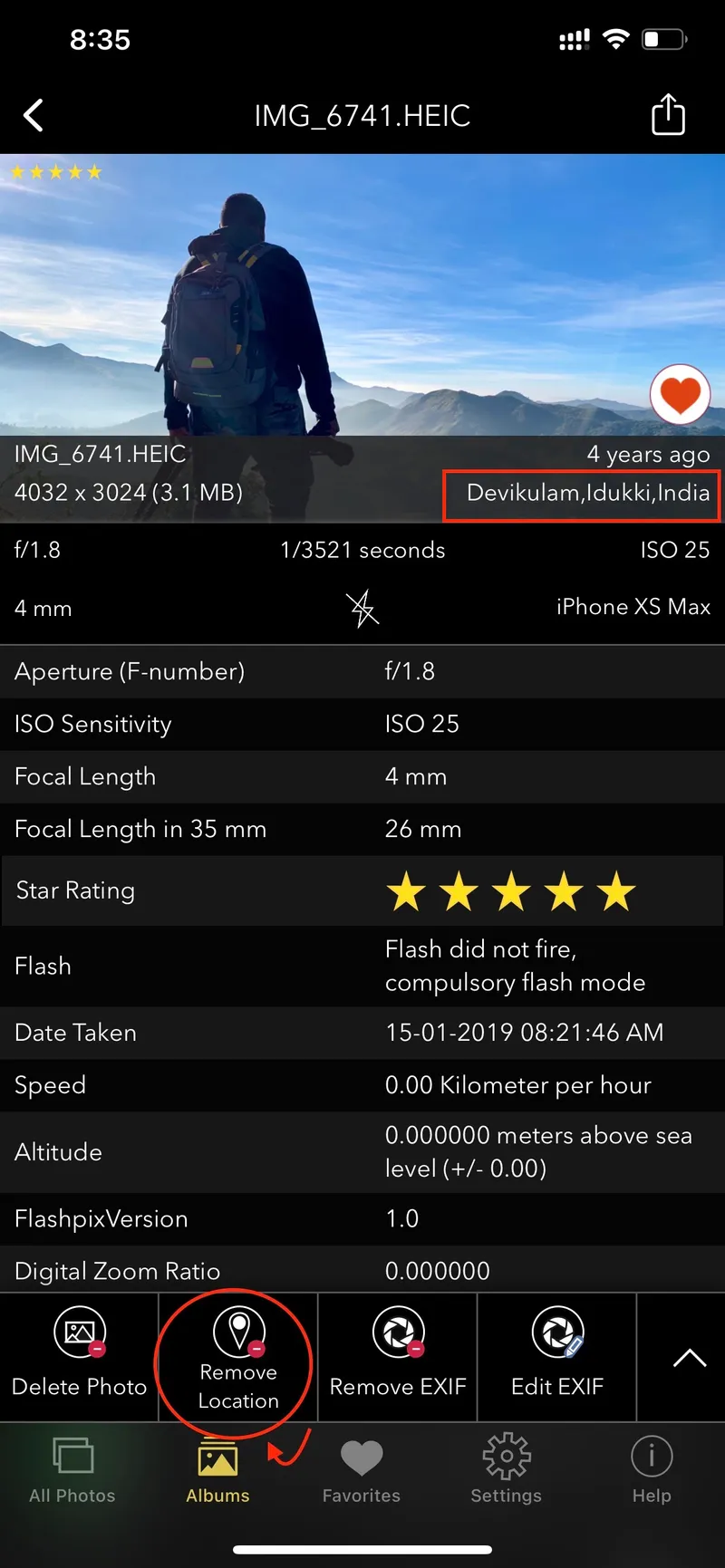
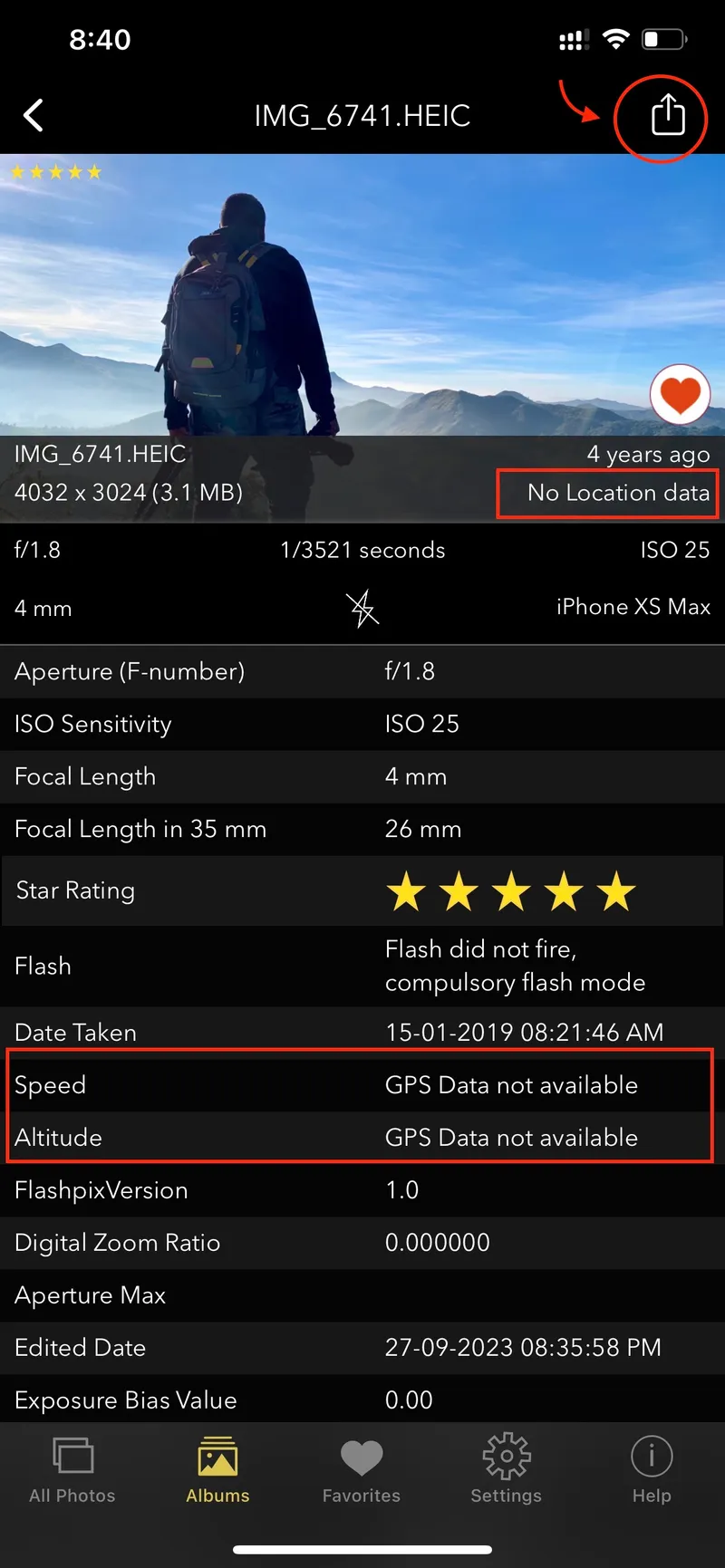
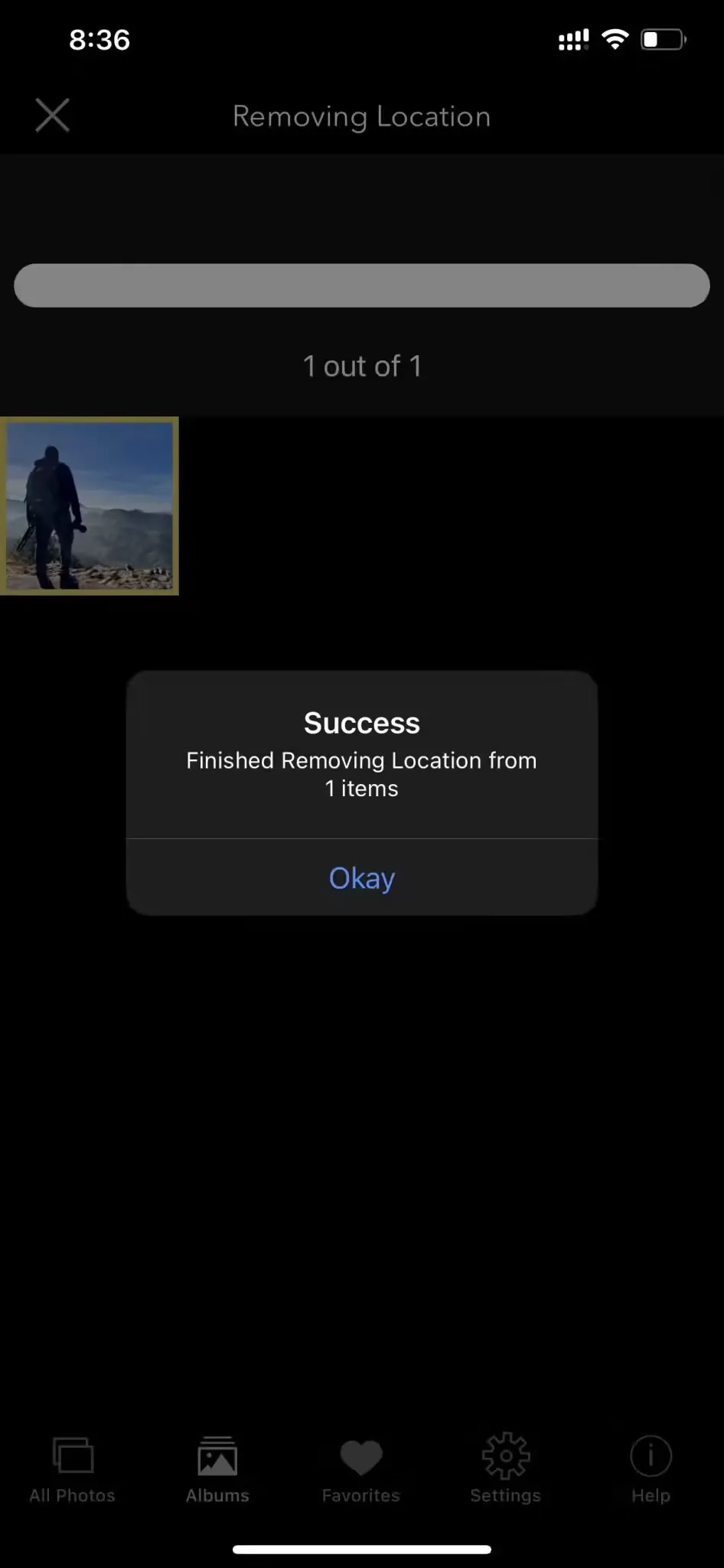
How to Edit or Remove Metadata for Privacy and Security
4. Do social media platforms remove EXIF data?
Some platforms like Instagram and Twitter automatically remove EXIF data when you upload photos. However, Facebook may retain some data, so it’s always best to strip EXIF metadata before sharing.
EXIF Data in Social Media: What You Need to Know
5. Can I stop my phone from recording EXIF data?
Yes, you can disable location services for your camera app to prevent your smartphone from recording GPS information in your photos.
By following these tips and understanding the risks associated with EXIF metadata, you can protect your privacy and stay safe online.
Related guides
How to Lock and Unlock Hidden Photos on iPhone?
Updated January 10, 2025
Hidden Photos not showing in Albums – How to fix it?
Updated January 3, 2025
How to Edit EXIF Metadata?: Privacy, Corrections, and more..
Updated November 5, 2024
Managing Photo Metadata for Privacy and Control
Updated October 19, 2024